In this article we will tell you how sounds are inserted onto maps. Before reading the article, we recommend that you familiarize yourself with the following entity object:
This is one of the shortest articles in our Tutorial, because... Inserting sounds onto the card is very simple and fast. For this purpose, one single object is used ambient_generic. Insert this object at the location on the map where you want the sound to come from.
Object ambient_generic has quite a few properties, but only a few of them are used in practice.
Name — if you give the sound a name, you can turn it on and off with a button or trigger;
Path/filename.wav of WAV — here you need to specify the path to the sound file in wav format;
Volume (10 = loudest) — sound volume. Values range from 0 to 10, with 10 being the loudest.
The remaining parameters determine various sound effects and are used extremely rarely.
Flags:
Play Everywhere — if checked, the sound will be heard throughout the entire map, i.e. from any point;
Small Radius — if checked, the sound will be heard at a short distance (up to 800 units);
Medium Radius - the same thing, only at medium distance (up to 1250 units);
Large Radius — the same thing at a long distance (up to 2000 units);
Start Silent — if checked, the sound will be turned off at the beginning of the round and will need to be turned on with a button or trigger;
Is NOT Looped — if checked, the sound file will be played once, i.e. it will not be repeated time after time. To play the sound again, you will need to activate it again.
Sounds bring the map to life. But use them in moderation, do not use annoying sounds (example: the hum of turbines on DE_PRODIDGY). The sounds should not be loud so that players do not have the desire to bind a command to any key STOPSOUND (muffles the playing sound :). If you have a lot of bushes and trees on your map, then the sounds of birds are perfect for them, near the water you can place the sounds of a flowing stream, if it is a waterfall, then the sound of falling water, if the map is sunny, then you can insert the sounds of grasshoppers, at night the sounds of crickets or barking dogs will perfectly create an atmosphere, on a gloomy map you can insert the sound of the wind, etc.
By the way, if you manage to find a good sound, then your card may be immediately remembered by the players. Agree, maps like DE_AZTEC And CS_ITALY you can find out without even looking at the monitor...
Object ambient_generic has quite a few properties, but only a few of them are used in practice.
Name — if you give the sound a name, you can turn it on and off with a button or trigger;
Path/filename.wav of WAV — here you need to specify the path to the sound file in wav format;
Volume (10 = loudest) — sound volume. Values range from 0 to 10, with 10 being the loudest.
The remaining parameters determine various sound effects and are used extremely rarely.
Flags:
Play Everywhere — if checked, the sound will be heard throughout the entire map, i.e. from any point;
Small Radius — if checked, the sound will be heard at a short distance (up to 800 units);
Medium Radius - the same thing, only at medium distance (up to 1250 units);
Large Radius — the same thing at a long distance (up to 2000 units);
Start Silent — if checked, the sound will be turned off at the beginning of the round and will need to be turned on with a button or trigger;
Is NOT Looped — if checked, the sound file will be played once, i.e. it will not be repeated time after time. To play the sound again, you will need to activate it again.
Sounds bring the map to life. But use them in moderation, do not use annoying sounds (example: the hum of turbines on DE_PRODIDGY). The sounds should not be loud so that players do not have the desire to bind a command to any key STOPSOUND (muffles the playing sound :). If you have a lot of bushes and trees on your map, then the sounds of birds are perfect for them, near the water you can place the sounds of a flowing stream, if it is a waterfall, then the sound of falling water, if the map is sunny, then you can insert the sounds of grasshoppers, at night the sounds of crickets or barking dogs will perfectly create an atmosphere, on a gloomy map you can insert the sound of the wind, etc.
By the way, if you manage to find a good sound, then your card may be immediately remembered by the players. Agree, maps like DE_AZTEC And CS_ITALY you can find out without even looking at the monitor...
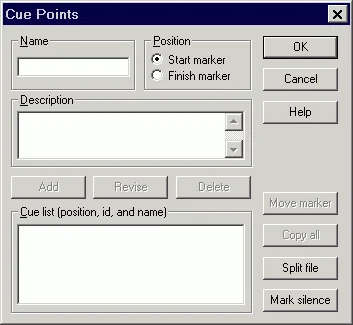 All you need to do is check "Start marker" (checked by default) and enter any name for the key point, for example: Start
. Then click on the "Add" and "OK" button (see figure below).
All you need to do is check "Start marker" (checked by default) and enter any name for the key point, for example: Start
. Then click on the "Add" and "OK" button (see figure below).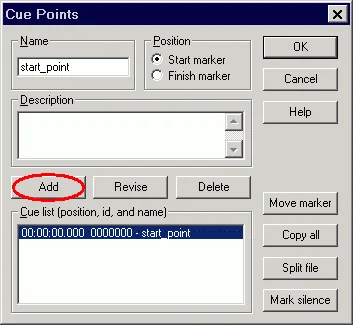 Next, save the file and use it on the map. All!