In this article we will talk about creating vertical stairs (as on the map cs_assault and many others). To create them we will use two new entity objects:
Stairs in CS consist of the two objects listed above: func_illusionary - depicts a staircase, func_ladder — the staircase itself (the invisible part along which the player climbs).
It would be useful to say that the standard size of stairs is 32 units in width and 3-4 units in thickness and height as it turns out. First, let's create the visual part of the staircase that the player sees in the game. To do this, we will use a texture with a mask (with blue parts), for example, {LADDER1 (there are also other standard textures for stairs: {ladder2, {ladder2b etc.).
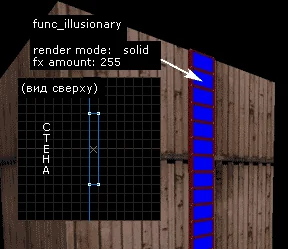
Let's create a brush with a width of 32 and a thickness of 4 units near the wall. And let's turn it into func_illusionary (see picture below). To make the blue parts on the textures transparent in the game, you need to set the following display parameters:
Render Mode — Solid;
FX Amount — 255.
 Now let's create a field that is invisible in the game, along which the player actually climbs, because... he can't just climb up func_illusionary
. To do this, we will build exactly the same brush with dimensions of 32x4 units, only we will paint it on all sides with a special texture AAATrigger (see picture below). Then click [Ctrl-T] and select from the list
func_ladder.
Now let's create a field that is invisible in the game, along which the player actually climbs, because... he can't just climb up func_illusionary
. To do this, we will build exactly the same brush with dimensions of 32x4 units, only we will paint it on all sides with a special texture AAATrigger (see picture below). Then click [Ctrl-T] and select from the list
func_ladder.
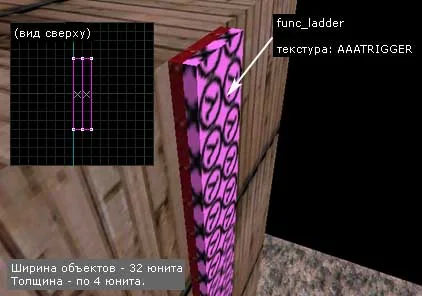
As you can see, we have posted func_ladder close to func_illusionary, this is not important, but, as they say, it won't hurt for the "cleanliness" of the work.
This is all! Object func_ladder will be invisible in the game, and the player will be completely confident that he is climbing a visible staircase (func_illusionary), but now you know that this is not so :)
It would be useful to say that the standard size of stairs is 32 units in width and 3-4 units in thickness and height as it turns out. First, let's create the visual part of the staircase that the player sees in the game. To do this, we will use a texture with a mask (with blue parts), for example, {LADDER1 (there are also other standard textures for stairs: {ladder2, {ladder2b etc.).
Let's create a brush with a width of 32 and a thickness of 4 units near the wall. And let's turn it into func_illusionary (see picture below). To make the blue parts on the textures transparent in the game, you need to set the following display parameters:
Render Mode — Solid;
FX Amount — 255.
Now let's create a field that is invisible in the game, along which the player actually climbs, because... he can't just climb up func_illusionary
. To do this, we will build exactly the same brush with dimensions of 32x4 units, only we will paint it on all sides with a special texture AAATrigger (see picture below). Then click [Ctrl-T] and select from the list
func_ladder.As you can see, we have posted func_ladder close to func_illusionary, this is not important, but, as they say, it won't hurt for the "cleanliness" of the work.
This is all! Object func_ladder will be invisible in the game, and the player will be completely confident that he is climbing a visible staircase (func_illusionary), but now you know that this is not so :)
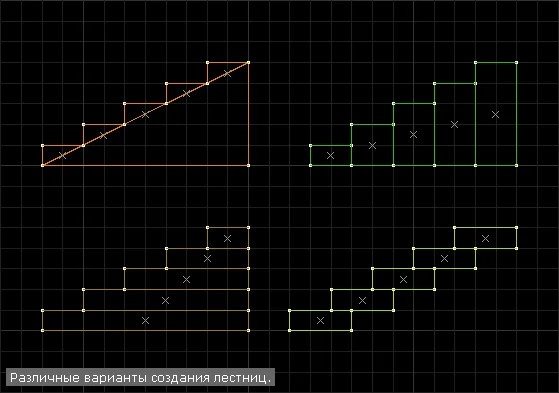 Remember that the height of the stairs should not exceed 16 units. This is necessary so that the player can climb the step no jump
. The length of the step is chosen arbitrarily. However, it is more convenient to climb flat stairs with a step length of 32 units. Steps 16 units high are also often used.
Remember that the height of the stairs should not exceed 16 units. This is necessary so that the player can climb the step no jump
. The length of the step is chosen arbitrarily. However, it is more convenient to climb flat stairs with a step length of 32 units. Steps 16 units high are also often used.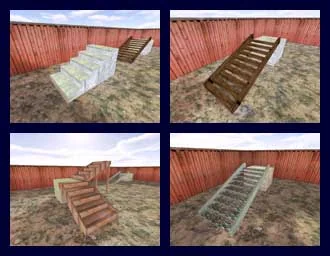
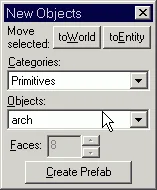 It would be a good idea to look into "Tools\Options\General" and find out whether the "Stretch arches to fit original bounding rectangle" checkbox is checked - how the created object will behave depends on this.
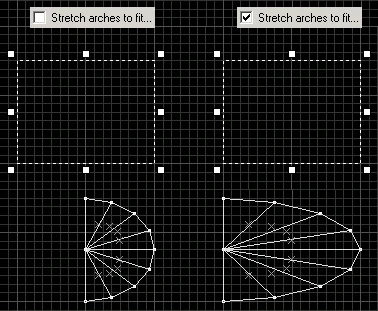 It's probably more convenient to check the box, because... in this case we know exactly what size the created object will be.
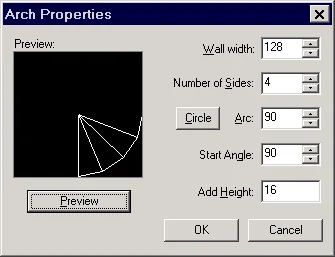 When changing any parameter, you can see the result by clicking the "Preview" button.
 The next two pictures show how best to "fix" the vertices.
 In the same way, it is necessary to "fit" all the vertices of the stairs to the grid.